


Saturday, September 11, 2010

Thursday, September 9, 2010
 I hope you enjoy this new WordArt, remember fighting our battles in life make us strong
You can download the WordArt here
Hugs lee xx
I hope you enjoy this new WordArt, remember fighting our battles in life make us strong
You can download the WordArt here
Hugs lee xx

 I made these tags with a new FTU ScrapKit called " Paint the town Pink"
It is from a amazing designer l have started working with called ' Shani' you can view her teams tutorials here and her ScrapKits here
Breast Cancer hit my family about 3 years ago, with my mother having it l also had a scare but l was lucky at that time. My mother " Maggie" is still with us and looking forward to the 5 year mark when she will be fully clear of Cancer.
Remember be the Star of your Cancer fight, and your come though anything in life
Shani what a amazing ScrapKit l look forward to using your kits in the future
Hugs lee xx
------------------------------
l used a mask from Vix_mask 410 you can find it here
I also used a font called Chachie for the names and WordArt, you can find it here
I used the amazing BCA Tubes of Ismael Rac which you can find here and Suzanne Woolcott which you can also purchase here
Okay l began these tags with a 800 x 800 image, which was resized at the end.
Next l add the paper of my choice, paper 4 for Diva and paper 10 for the Gorjuss tag
This was followed by layers, load/save mask and l selected Vix_Mask 410 and load the mask
Next l selected the elements, for this l will use the Gorjuss tag
Cityscape2 and resized it to 500 and copy/paste it to the tag, l add a drop shadow of 3
Flowerpetals came next once they were resized to 500 and sent down below the Cityscape a drop shadow of 3 was also added
The curtain can next it was resized to 300 and placed on the tag, l keep it were it landed somehow it fitted in the spot. A drop shadow of 3 was also added
BCARibbon1 was resized to 200 and add to the tag it was placed in front of the curtain and given a drop shadow of 3
Lips were the last element add once they were resized to 150 l put them towards the bottom left of the curtain and add a drop shadow of 2
The WordArt l will make up and post it on my blog, so feel free to use it
It has been posted here
Dont forget these licence's for any tag you make
Hugs lee xx
I made these tags with a new FTU ScrapKit called " Paint the town Pink"
It is from a amazing designer l have started working with called ' Shani' you can view her teams tutorials here and her ScrapKits here
Breast Cancer hit my family about 3 years ago, with my mother having it l also had a scare but l was lucky at that time. My mother " Maggie" is still with us and looking forward to the 5 year mark when she will be fully clear of Cancer.
Remember be the Star of your Cancer fight, and your come though anything in life
Shani what a amazing ScrapKit l look forward to using your kits in the future
Hugs lee xx
------------------------------
l used a mask from Vix_mask 410 you can find it here
I also used a font called Chachie for the names and WordArt, you can find it here
I used the amazing BCA Tubes of Ismael Rac which you can find here and Suzanne Woolcott which you can also purchase here
Okay l began these tags with a 800 x 800 image, which was resized at the end.
Next l add the paper of my choice, paper 4 for Diva and paper 10 for the Gorjuss tag
This was followed by layers, load/save mask and l selected Vix_Mask 410 and load the mask
Next l selected the elements, for this l will use the Gorjuss tag
Cityscape2 and resized it to 500 and copy/paste it to the tag, l add a drop shadow of 3
Flowerpetals came next once they were resized to 500 and sent down below the Cityscape a drop shadow of 3 was also added
The curtain can next it was resized to 300 and placed on the tag, l keep it were it landed somehow it fitted in the spot. A drop shadow of 3 was also added
BCARibbon1 was resized to 200 and add to the tag it was placed in front of the curtain and given a drop shadow of 3
Lips were the last element add once they were resized to 150 l put them towards the bottom left of the curtain and add a drop shadow of 2
The WordArt l will make up and post it on my blog, so feel free to use it
It has been posted here
Dont forget these licence's for any tag you make
Hugs lee xx
Tuesday, September 7, 2010

 These tags were made using the awesome ScrapKit " Allie Gear" from Connies Creative Chaos. you can view Connie's Blog here
You can purchase this ScrapKit at Aussie Scrap Designs, please click here
The font l used is Chachie you can find it here
The tube from Suzanne Woolcott you can purchase from her store here
Connie l really enjoyed playing with this Scrapkit and l look forward to using any other ScrapKit you make.
Keep up the good work
Hugs lee xx
----------------------------
l started these tags with a 800 x 800 image and add Brackets 2 adding a drop shadow of 7
Then l selected Glitter heart 2 and moved it around into postion and removed a small straight section at the end adding a drop shadow of 3 and senting it below the Bracket
Star_Stars3 came next it was copy and paste to the tag with a drop shadow of 3
Next came the Poser on one tag and a tube from Suzanne Woolcott on the other tag
Skull 1 and Missy Skull 3 were next, once they were resized to 150 and add to the tag a drop shadow of 3 was added
SportsDay Templates 1_3a and 1_3b were both resized and add to the right of the poser/tube above skull 1, then a drop shadow of 2 was given
Sportsday template 1_1b and 1_1c were then resized and add to the tag on different angles and to the right and left of the image/tube
Bunny Template and Cat Template were resized to 150 and added to the left side of the tag, each were given a drop shadow of 3
I then added Connie's name to the tags using Chachie
And add the Copyright and license details
Hugs lee xx
These tags were made using the awesome ScrapKit " Allie Gear" from Connies Creative Chaos. you can view Connie's Blog here
You can purchase this ScrapKit at Aussie Scrap Designs, please click here
The font l used is Chachie you can find it here
The tube from Suzanne Woolcott you can purchase from her store here
Connie l really enjoyed playing with this Scrapkit and l look forward to using any other ScrapKit you make.
Keep up the good work
Hugs lee xx
----------------------------
l started these tags with a 800 x 800 image and add Brackets 2 adding a drop shadow of 7
Then l selected Glitter heart 2 and moved it around into postion and removed a small straight section at the end adding a drop shadow of 3 and senting it below the Bracket
Star_Stars3 came next it was copy and paste to the tag with a drop shadow of 3
Next came the Poser on one tag and a tube from Suzanne Woolcott on the other tag
Skull 1 and Missy Skull 3 were next, once they were resized to 150 and add to the tag a drop shadow of 3 was added
SportsDay Templates 1_3a and 1_3b were both resized and add to the right of the poser/tube above skull 1, then a drop shadow of 2 was given
Sportsday template 1_1b and 1_1c were then resized and add to the tag on different angles and to the right and left of the image/tube
Bunny Template and Cat Template were resized to 150 and added to the left side of the tag, each were given a drop shadow of 3
I then added Connie's name to the tags using Chachie
And add the Copyright and license details
Hugs lee xx
Wednesday, September 1, 2010

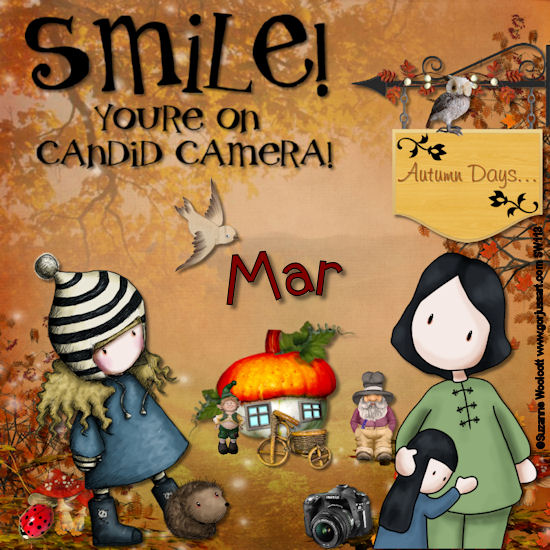
These tags were made with another one of Mar's amazing ScrapKits " Autumn Days"
You can view Mar's Blog here
You can purchase the ScrapKit at Mar's Store here
Mar this was a truely amazing ScrapKit l had a ball playing with it and l must say l like the results
2 Peas Unconventional Font was used for the names, you can find all the 2 Peas Fonts here
The Wordart came from Annie'slittlefootprints you can download it here
Hugs lee xx
-----------------------------
Mars tags began with a 800 x 800 image, this followed with paper with paper 4 after it was resized to 800 and add to the image
Next l selected element 20 which was add once l resized it to 250 and put it in place on the tag a drop shadow of 2 was add
Element 18 was resized to 50 and add to the tag no drop shadow was added
Next came the wordart which was resized to 350 - 360 and add to the left corner of the tag
Elements a48 and 42 were next, the house was resized to 280 and added to the tag with element 42 resized to about 130 and added to the front of the house, both were given a drop shadow of 2
The camera icon was next it was given a minor resize and add to the tag with a drop shadow of 2 given
Elements 28 and 31 were the second last elements add once they were resized to 100 and add to the tag, a drop shadow of 1 was given to each
Element 57 was resized to 150 and added to the tag with a dtop shadow of 2
The tubes were then add to each tag and resized to fit nicely in their spots of it, each was given a drop shadow of 3
Licence details or any copyright details are last
Hugs lee xx

l had my mum in mind when l made this tutorial
She is 76 years old and lives in Moama NSW with Bill, his been in our lives for some time and l must admit his a great stepdad.
Mum has just had a knee replacement and heads home tomorrow, her girls lol well myself and my sister Marcia are heading up there tomorrow to check on the two of them lol
Any way the ScrapKit l used is " Mirror Lake" it is from Wee Faerie you can get it here
I used a Font called " Arkitex" for this tag you can get it here
Hugs lee xx
-----------------------------
This tag began with a 800 x 800 image and l added paper 15 was resized to 800 and add to the image
Bubbles came next once they were resized to 500 and add to the tag with a drop shadow of 1
Gold Squiggles was add next to the middle of the tag
Hearts and the moon came next and once resized to 400-450 and add to the tag a drop shadow of 2 was add to the moon
Turtle and swansreflection were both resized to 110 and add to the tag with no shadow
PaperBoat was resized to approxly 50 and added to the back of the tag with a drop shadow of 1
Petals 2 was next once a resizing was done to 200 it was add to the edge of the water and a drop shadow of 1 was given
WordArt2 was resized to 300 and added to the tag with a small adjustment, no drop shadow was add
Last came the licence details, please dont forget them
Hugs lee xx

 These tags were made with a ScrapKit called " Sugar Coated"
WeeFaerie made the kit and many other amazing ones, you can view her blog here
Here is the direct link to the ScrapKit
I used a Font called " 2Peas Unconventional" you can find it here
Also l used the amazing work of Suzanne Woolcott and Toosh you can purchase there images on the following links, Suzanne's here and Tooshtoosh here
Hugs lee xx
-------------------------------
These tags were made with a ScrapKit called " Sugar Coated"
WeeFaerie made the kit and many other amazing ones, you can view her blog here
Here is the direct link to the ScrapKit
I used a Font called " 2Peas Unconventional" you can find it here
Also l used the amazing work of Suzanne Woolcott and Toosh you can purchase there images on the following links, Suzanne's here and Tooshtoosh here
Hugs lee xx
-------------------------------
l started this tag with a 800 x 800 image and add paper 16 then went to layers, load/save mask and selected Vix_410mask
Next came the frame 5 which l resized to 550 and added it to the tag, paper 1 was next selected and after a resizing to 400 it was add to a flood fill and used in the centre of the frame. A drop shadow of 10 was add
Border element cam next after a small resizing it was added to the centre of the frames with a small over flow, drop shadow of 1 was add also
Cluster2 was resized to 150 and added to the top of the green frame with a drop shadow of 1
Paper flower and sprinkles is added to the back of the frame once it is resized to 600, a second sprinkles was also mirrored and flip so both ends have a few showing at the ends, drop shadow of 2 was add
Candy apple tree was next, once it was resized to 420 it was placed to the right of the frame with a drop shadow of 3
Cherry house was resized to 250 and add to the left side of the tree with a drop shadow of 3, the gumdrop elements were next once they were resized to 120 and given a drop shadow of 1
MtSundae was the last element add once it was resized to 100 with further adjustment it was put into place on the tag
The Sweet WordArt was then added once it was also resized and a drop shadow of 2 was add
The tubes were then selected and 1 was also sent down on the green frame behind the sundae so it looked like they were sitting at a table eating lol
Dont forget the copyright and licence details
Hugs lee xx
Subscribe to:
Posts
(Atom)


